AI Automation: Practical Automation for Real Support Queues
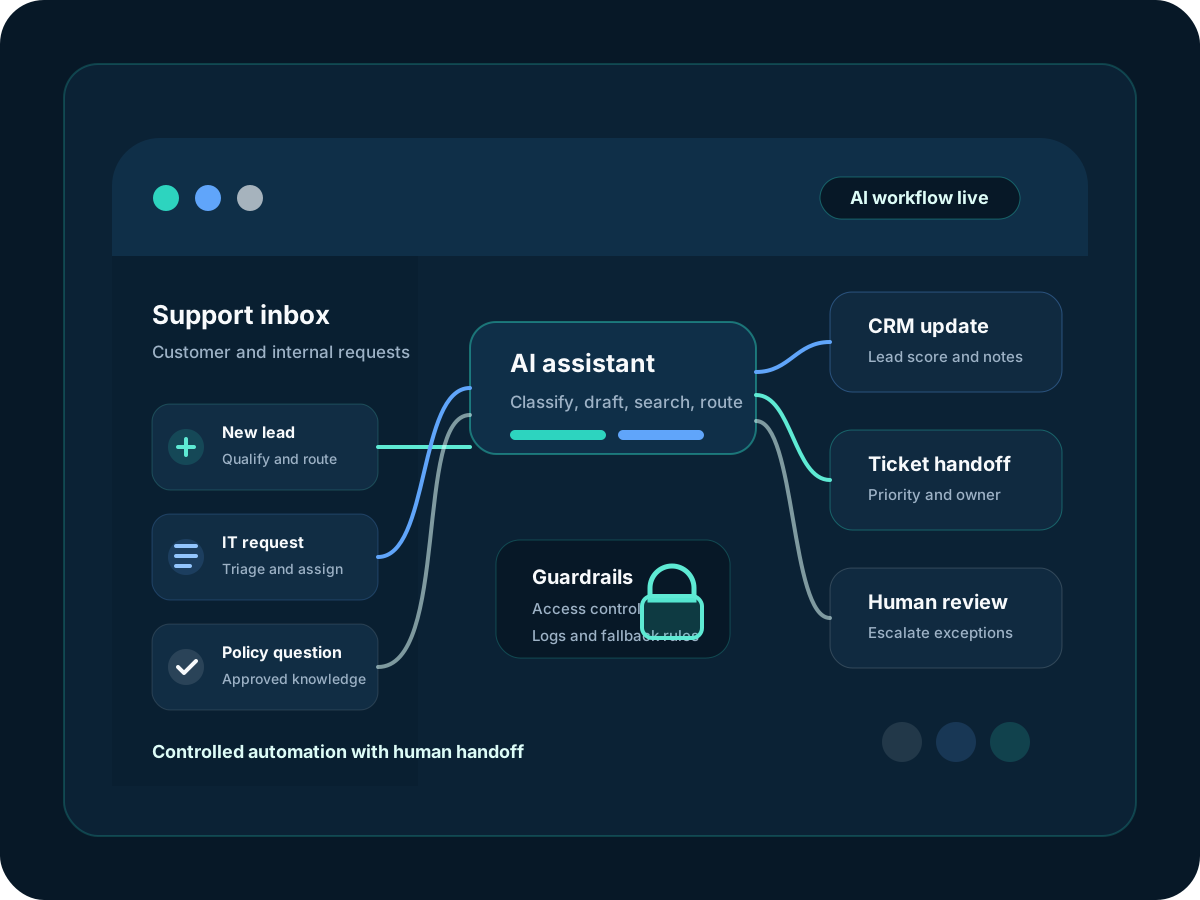
AI automation for the places where work gets stuck: repeated support questions, incomplete intake forms, ticket triage, CRM updates, and after-hours requests. BPro IT maps your current tools first, then builds controlled automation with clear ownership and escalation paths.
Proof to review
See what supports the ai automation & chatbots promise.
Buyer-friendly samples and checklists make the operating model easier to inspect before a call.
Signs You Need AI Automation & Chatbots
If any of these challenges sound familiar, it's time to talk.
Your team answers the same tickets every week
Password guidance, booking questions, document requests, lead intake, and status checks keep landing in the same inboxes. The work is simple, but it still interrupts people.
Knowledge sits in places new staff cannot find
Answers are split between Microsoft 365, Google Drive, ticket notes, SOPs, spreadsheets, and chat threads. That makes every handoff slower than it should be.
AI access needs rules before it needs prompts
Before a bot touches company data, you need to know what it can read, who can use it, what gets logged, and when it must stop and route to a person.
Buying another tool can create another queue
A chatbot that is not connected to your ticketing, CRM, documents, or escalation process becomes one more system to check. We start with the queue, not the sales demo.
The AI Automation & Chatbots Advantage
Here's what sets our ai automation & chatbots service apart.
Platform Choice Based on the Job
We compare what you already use with what the process needs. The answer might be Microsoft 365, a helpdesk rule set, API orchestration, a chatbot platform, or a small custom service.
Access Rules Before Launch
We define source data, user roles, logging, escalation rules, and blocked actions before go-live, then document those controls for your team.
Human Review for Exceptions
Routine requests can move quickly, while sensitive, unusual, or high-value cases go to the right person with context already attached.
Measured Against the Queue
We track the practical numbers: fewer back-and-forth messages, better first intake, shorter ticket triage, faster lead response, or cleaner reporting.
What's Included
A complete breakdown of everything covered under our ai automation & chatbots service.
Website and Support Chatbots
Customer-facing chat for FAQs, lead qualification, appointment routing, support intake, and escalation. Every bot needs a clear point where it hands off.
Internal Knowledge Assistants
Private assistants that search approved SOPs, service documents, onboarding notes, and technical knowledge bases instead of guessing from public content.
Helpdesk and Ticket Automation
Ticket categories, priority suggestions, missing-detail questions, duplicate checks, draft responses, and routing rules for IT and support teams.
Workflow Automation
Connections between forms, CRM, email, spreadsheets, ticketing systems, cloud storage, and reports so staff are not copying the same details twice.
AI Governance Setup
Approved-tool lists, data handling rules, access reviews, prompt templates, and review points for teams that want AI without uncontrolled usage.
Reporting and Optimization
Simple reporting for usage, handoffs, failed answers, response quality, and time saved so the automation can be adjusted after real use.
How AI Automation Delivery Works
A clear, structured approach so you know exactly what to expect at every stage.
Workflow Discovery
We review the tickets, forms, inboxes, documents, and systems involved, then mark where ownership, sensitive data, and human approval matter.
Automation Map
We document integrations, permissions, fallback rules, failure cases, and success metrics before recommending a platform or custom build.
Build and Test
We build with real scenarios, tune responses, validate data access, and test the moments where the system should stop and ask a person.
Launch and Improve
We train your team, hand over runbooks, review logs, and refine prompts, routing, and integrations after people start using it.
Who We Serve
Our ai automation & chatbots service is deployed across a range of industries and business types.
Customer Support Teams
Collect the missing details upfront, answer approved questions, and route complex issues with the customer context already attached.
IT and Helpdesk Operations
Triage tickets, guide common requests, collect device onboarding details, search internal knowledge, and handle after-hours intake without opening access too widely.
Sales and Admin Teams
Qualify enquiries, capture missing fields, trigger CRM notes, create follow-up tasks, and make sure the first reply is not delayed by time zones.
Multi-Region Businesses
Give US, UK, UAE, and remote teams a controlled first line of help when the main owner is offline.
Frequently Asked Questions
Related Services